


Visit in the Hospital del Mar
Outpatient Care
The Outpatient Care service can be accessed
- Sent by the medical practitioner or specialist: For a first visit, your doctor will refer you to our centre using a referral slip. This request goes directly to the Hospital, and you will receive notification of the day and time of the visit by post.
- Made an appointment by the Emergency Service: After urgent care, if the doctor deems it necessary, the Emergency Admissions Service will arrange a day and time for you to visit Outpatient Care.
- Made an appointment by the Hospitalization Area: At the time of discharge from the hospital, the next visit will be arranged for you in Outpatient Care, to monitor your process.
Surgical Area
- ALL patients will be able to enter with 1 companion/relative
- "Access control" staff and, failing that, reception staff will monitor the arrival of the scheduled surgical patient. The time slot will be from 6.30 am to 8 pm.
- They will be checked for wearing a surgical mask, and will be asked to wash their hands with the hydroalcoholic solution before entering the hospital.
- Once the necessary checks have been made, the patient will go to the appropriate unit.
Location: first floor.
Patients with Scheduled Admission:
Between 6:30 a.m. and 8:00 a.m.:
Entrance through the main building.
Complementary Examinations corridor → Day Hospital.
Elevator to the first floor → UPQ/CMA admission desk.
After 8:00 a.m.:
Entrance through Building B.
Elevator to the first floor → UPQ/CMA admission desk.
Waiting Room for Surgical Patients' Families:
Entrance through the main building.
C2 corridor → C2 elevator (yellow).
First floor → waiting room.
In the case of surgery in Hospital del Mar.
- Visit the section on Visiting a relative at the Hospital de Mar.
Transfer to the Hospitalization Unit
The circuit established in the internal guide of visits for admitted patients will be applied.
Àrea Ambulatòria
- Recommendation to enter with only 1 family member/companion.
- Do not arrive before 15 minutes.
- Do not come with symptoms of cough, fever and/or nasal congestion.
Surgery Virtual Waiting Room
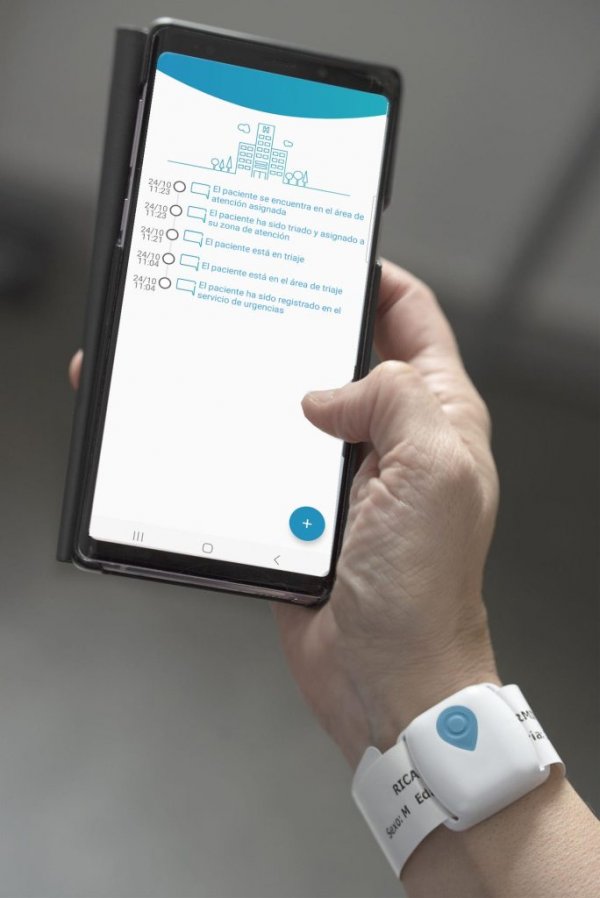
Real-time information during surgery
With the surgical identification bracelet, you can track the status of a family member or companion's surgical process at any time from your mobile phone.
How does the tracking work?
-
Scan the QR code located below.
-
Access the tracking platform (no registration required).
-
Enter the tracking code provided at:
-
Admissions of the Pre-admission and Major Ambulatory Surgery Unit
-
Admissions Service.
-
-
Check the updated status of the surgical process and receive notifications on your phone.

What information will you receive?
Throughout the surgical process, you can receive alerts regarding:
Preparation Stages (Admission and Reception)
- Admission/Waiting Room.
- Changing Room.
- Reception/Preparation.
- Pending Transfer.
Surgical Area (Inside the Operating Room)
- Arrival/Pre-anesthesia.
- In Operating Room/Anesthesia.
- In Surgery.
- Surgery Finished/Finalizing.
Recovery and Discharge (Post-Surgical)
- Transfer to PACU (Recovery).
- Pending Transfer to Unit.
- Discharge / End of Process.
This information is also displayed on the screens in the waiting room.
Stay informed, without the wait
This system keeps you informed in a clear and continuous way, while the clinical team focuses on patient care.
Need help?
If you have any questions about how the tracking works, please contact the Admissions team at the Pre-admission and Major Ambulatory Surgery Unit or the Admissions Service.
Important reminder
Before leaving the hospital, please return the identification wristband. This allows the device to be reused and contributes to more sustainable healthcare.
The hospital has free Wi-Fi for your convenience. Network: USUARIS-HMAR